 OmniViz
 Solar Panel Wizard
Lay your phone on a tilting panel: it shows the best tilt and direction for today or the weeks ahead.
Where is the sun, and where should your panel point?
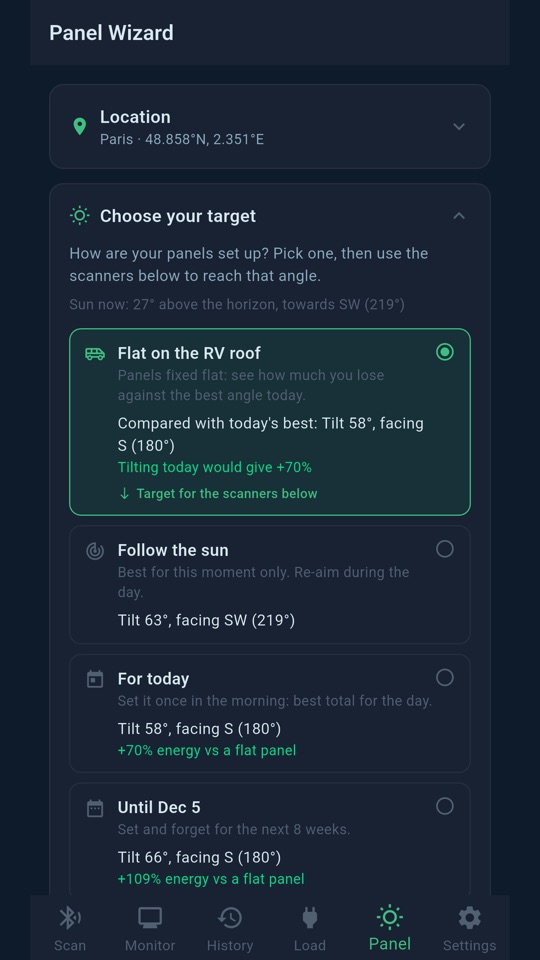
Set your location with the phone's GPS or by typing a town. The wizard computes the sun's path for that place and the best angle for your panel, depending on the target you choose:
- Flat on the roof: for fixed flat panels, it tells you how much energy you lose compared with the best angle today.
- Follow the sun: the best position right now.
- For today: one setting in the morning for the best total of the day.
- Until a date (Expert): the best fixed angle for the coming weeks.
Aim with your phone
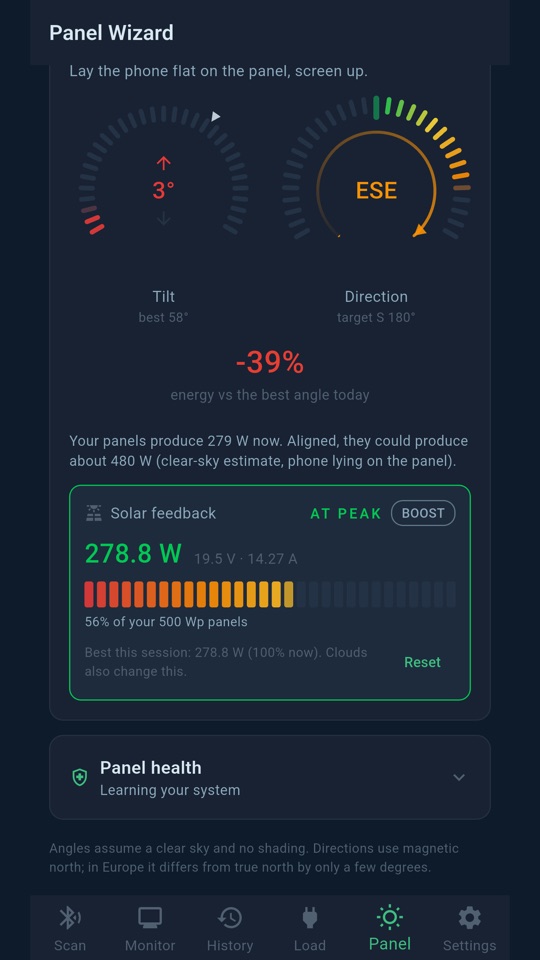
Lay the phone on the panel, screen up. Two gauges show the tilt and the direction, with arrows telling you which way to move, and turn green with a LOCKED banner and a vibration when you are on target. If the van's steel disturbs the compass, the app tells you to step outside for a reading.
Check it with real production
Connected to your controller, the wizard shows your panels' live power on a meter and says AT PEAK when you have found the best position. In Expert mode, a panel health check compares your daily production with a clear sky to spot a sudden drop, a slow decline or shading at certain hours.