 OmniViz
 Safe battery settings
Validated presets for every battery type, and a push to the controller that checks everything twice.
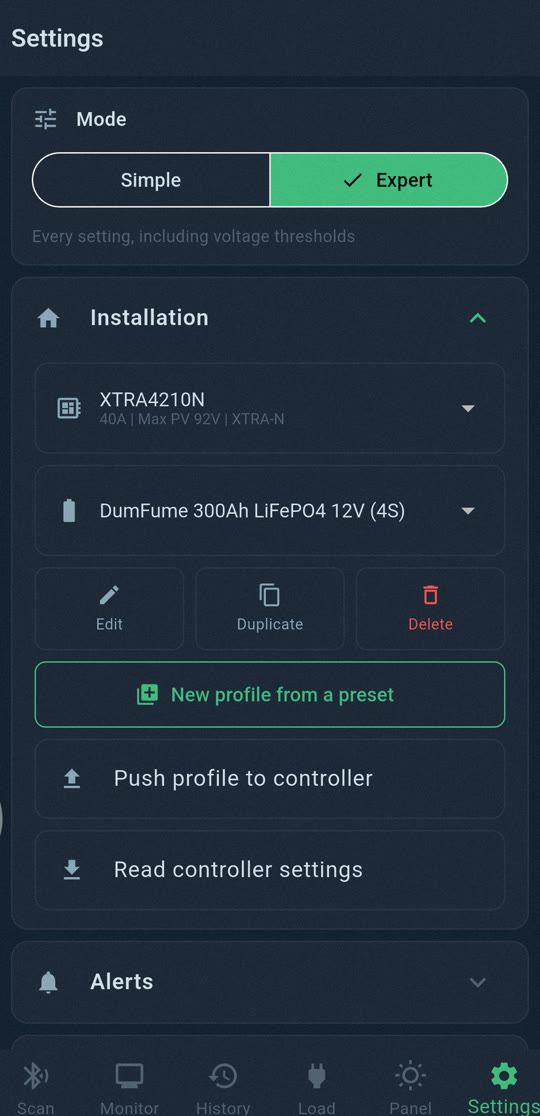
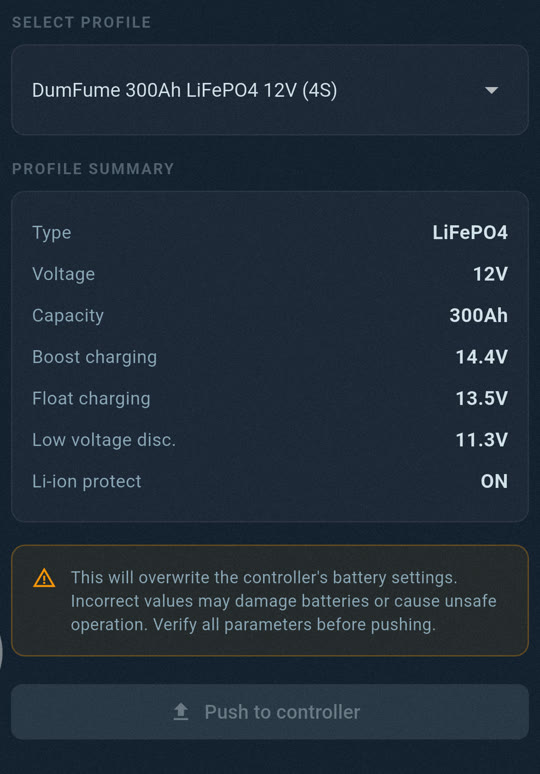
Start from a validated preset
OmniViz Solar comes with 18 battery presets: LiFePO4 and Li-NMC at 12, 24 and 48 V, sealed/AGM, GEL and flooded lead-acid. The LiFePO4 presets are the values we validated on our own van, explained in our LiFePO4 settings guide. Pick one, give it your battery's name and capacity, and you are ready.
Every change, checked
When you send a profile to the controller, the app:
- reads the controller's current settings;
- shows you every value that will change, from the old value to the new one, and asks you to confirm;
- saves a backup of the current settings;
- checks the voltages against Epever's own rules, so the controller cannot reject half of them;
- writes them in one go, the way Epever's own app does;
- reads everything back and tells you clearly whether the controller applied them.
Changed your mind? Restore previous settings puts the backup back, with the same checks.
Simple or Expert
In Simple mode, only validated presets can be sent: you can change the name and the capacity, nothing that could harm your battery. In Expert mode you can edit all twelve voltage thresholds, the boost and equalize times and the temperature limits, with every rule checked as you type, read the controller's current settings and save them as a profile.